
Overview
Non-job events (NJEs) are how dispatchers and back-office admins block off technician time for activities like meetings, training, or breaks. They’re essential for workforce planning, accurate payroll, and protecting technician time.
The legacy NJE experience had fallen behind job scheduling. This redesign brought NJE creation and management in line with the job scheduling experience on the Dispatch Board, with recurrence, multi-technician scheduling, verified locations, integration controls, and a full audit trail.
The Problem
Dispatchers trying to block off technician time found creating and managing non-job events error-prone, inflexible, and frustrating. The experience lacked intuitive editing workflows, didn’t account for complex recurrence patterns, and integrated poorly with Dispatch Pro, Capacity Planning, and Timekeeping.
- High support volume: NJEs were among the top sources of dispatch support cases, driven by UX confusion and system misbehavior.
- Inaccurate timesheets: poor NJE coverage led to untracked time, payroll errors, or unbilled hours.
- Limited scalability: no support for recurring meetings, multi-tech scheduling, or audit trail visibility, all critical for growing enterprise accounts.
- Leaky downstream behavior: with no integration controls, NJEs showed up in systems where they didn’t belong, such as Dispatch Pro or mobile.
- Workarounds and duplication: users re-created the same events every week or kept offline calendars alongside ServiceTitan.
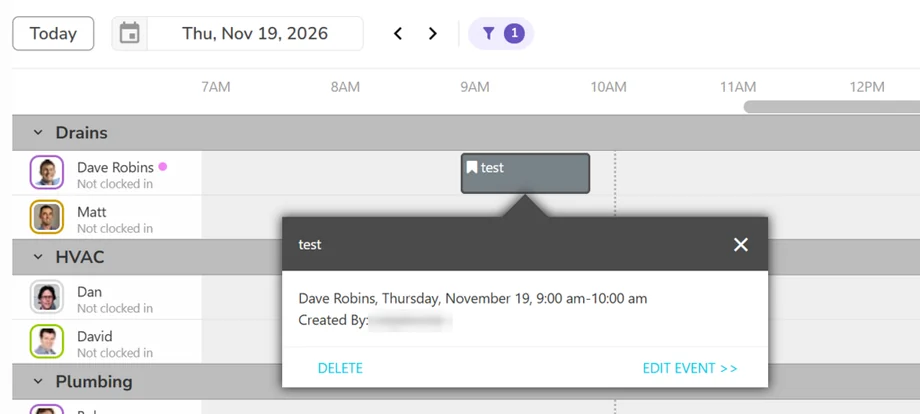
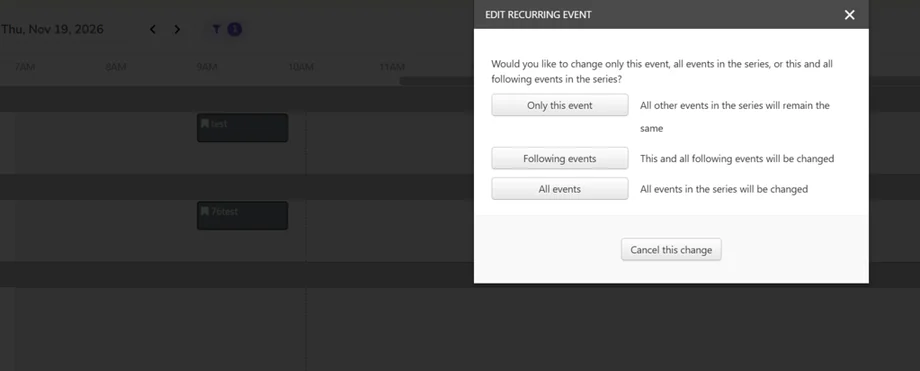
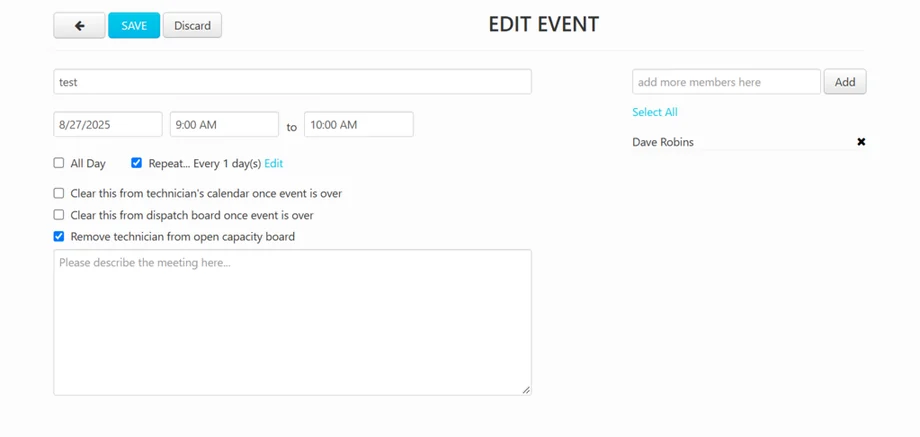
Before: the old experience
This is what dispatchers were working with before the redesign.
Goals
- Enable dispatchers and back-office users to quickly and confidently create, edit, and manage NJEs.
- Reduce support volume caused by confusion, bugs, and outdated workflows.
- Improve data accuracy for downstream systems (Timesheets, Capacity Planning, Dispatch Pro).
- Create a consistent, extensible architecture that supports enterprise scale: recurrence, audit trail, and bulk actions.
- Improve dispatcher trust and satisfaction with the calendar experience.
Target metrics set for after general availability (goals, not results):
- 50% fewer NJE-related support cases within 90 days
- A 10% lift in CSAT on dispatch tools within 30 days
- Adoption of the new experience by at least 75% of tenants within 60 days
Key Design Challenge
NJEs had to work like jobs without being jobs. The redesign needed to mirror the job scheduling experience dispatchers already knew, while giving them explicit control over how each event affects payroll, capacity, Dispatch Pro, and what technicians see on mobile. It also had to work across the Weekly, new Daily, and Classic Dispatch Boards without redesigning the technician mobile apps.
Design Approach
- Mirror job scheduling: the hypothesis was that matching job scheduling patterns (timeline drag-and-drop, recurrence, tech selection, address input, audit trail) would reduce friction and increase confidence when planning technician time.
- One consistent panel: rebuilt with the shared dispatch component library, consistent with the new Daily Board, as a side drawer that resizes the board instead of covering it.
- Explicit integration controls: simple checkboxes replace hidden, inconsistent behavior across connected systems.
- Traceability by default: every change is recorded so dispatchers and admins can understand what happened to an event.
- Focused scope: smart conflict resolution, NJE reporting dashboards, timesheet automation, and mobile redesign were explicitly left out to focus on the most painful problems.
The Solution
Creating an Event
Dispatchers create an NJE from a side panel that resizes the Dispatch Board instead of covering it, so the schedule they’re planning around stays visible. It works the same way on the Weekly, new Daily, and Classic boards. One event can cover several technicians at once, and the Technicians picker is grouped by team, so blocking off a whole crew for a meeting or training takes a few clicks instead of one event per person.
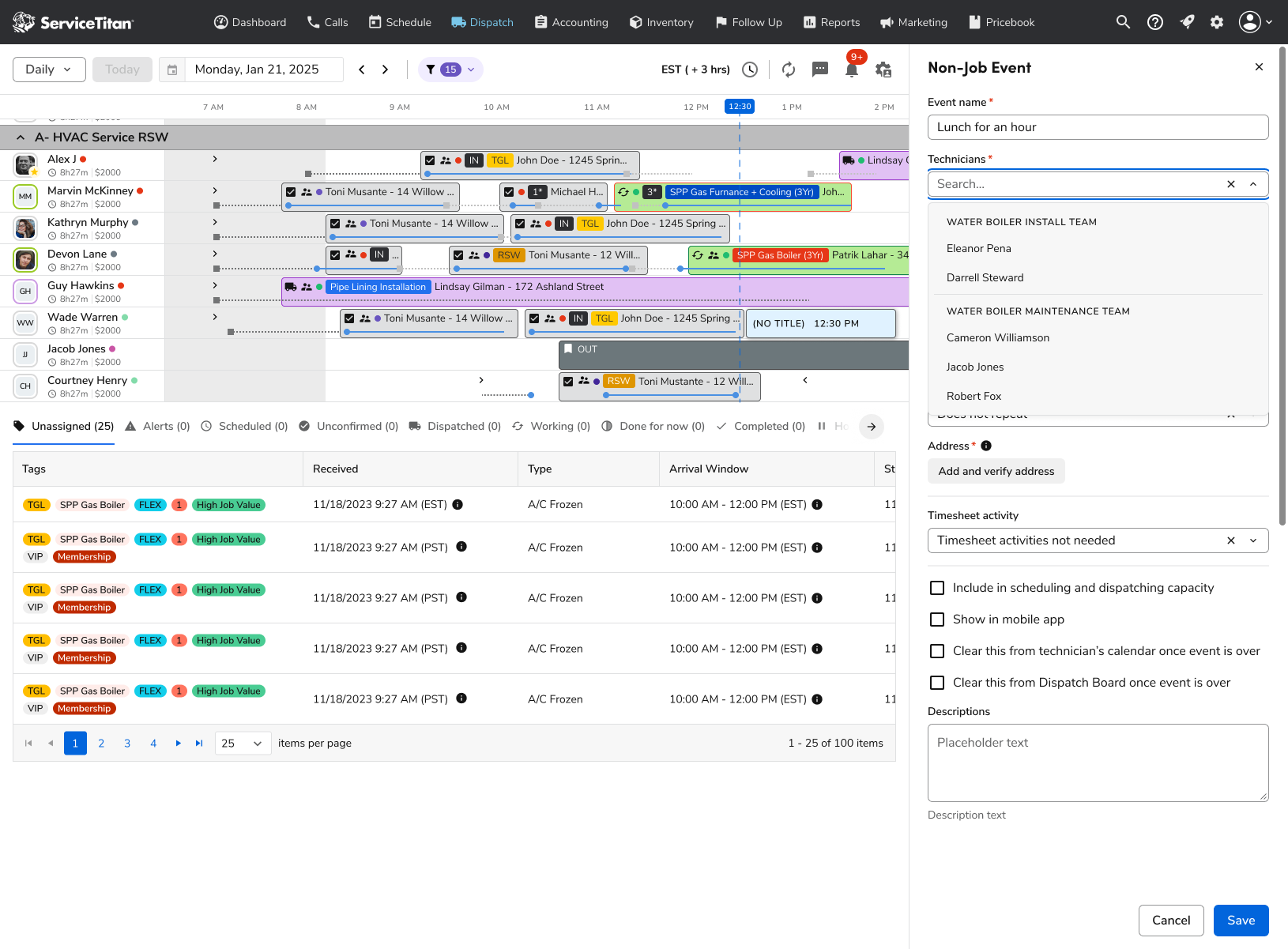
The Technicians picker groups people by team, so one event can cover a whole crew.
The rest of the form mirrors job scheduling: date, start and end time with an all-day option, standard and custom recurrence with human-readable summaries, and an address field with verification and a dropdown of previously used addresses. Timesheet activity selection is built into the same flow, so payroll is handled at the moment the event is created rather than fixed afterward.
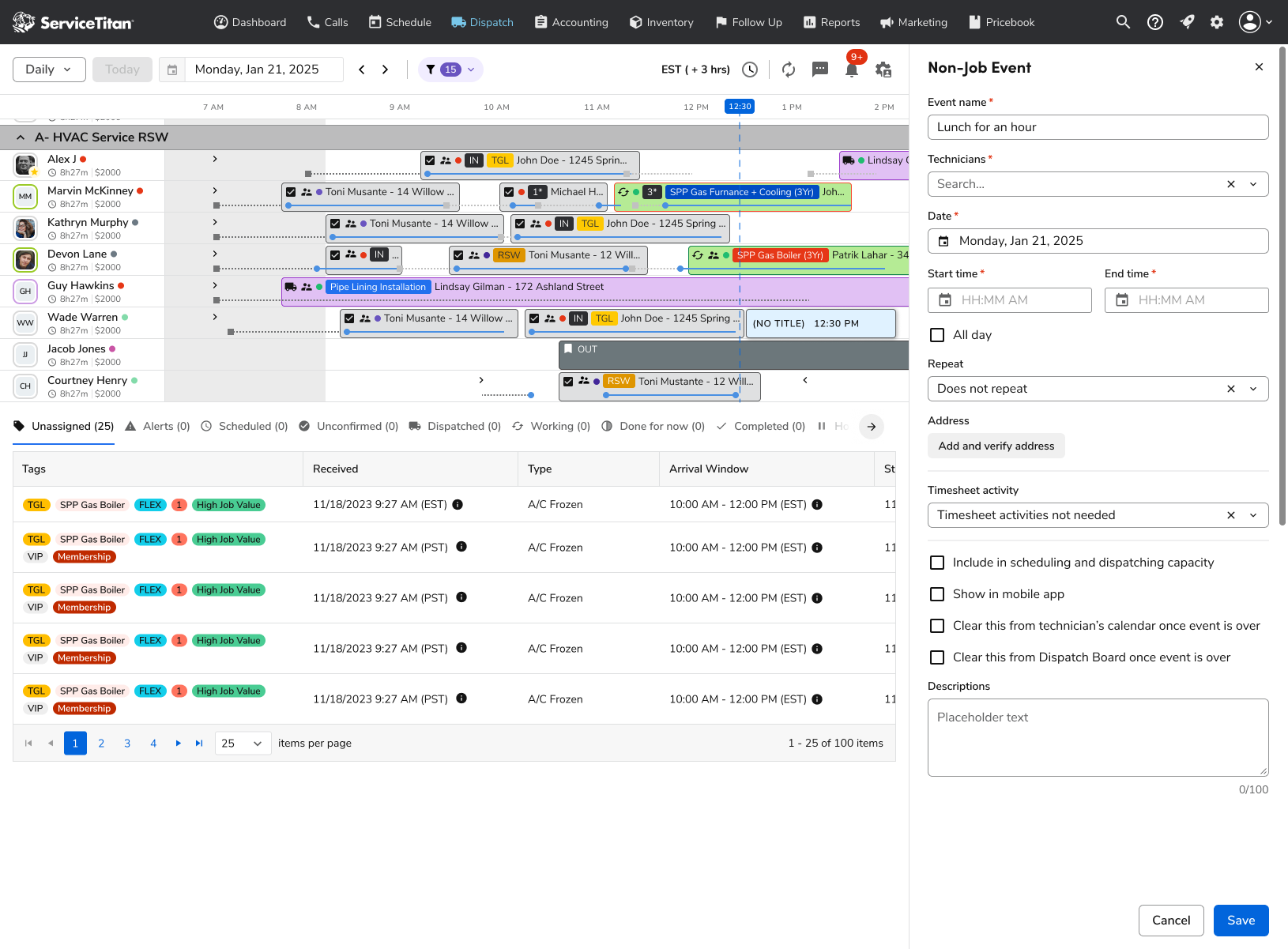
The full create form, from scheduling details to timesheet activity and visibility settings.
Visibility and Capacity Controls
Four plain checkboxes replace behavior that used to be hidden and inconsistent across connected systems. Dispatchers decide whether an event counts toward scheduling and dispatching capacity, whether technicians see it in the mobile app, and whether it clears from the technician’s calendar and the Dispatch Board once it’s over. NJEs show up only where they should, and Dispatch Pro and Capacity Planning treat that time the way the dispatcher intended.
Event Details and Audit Trail
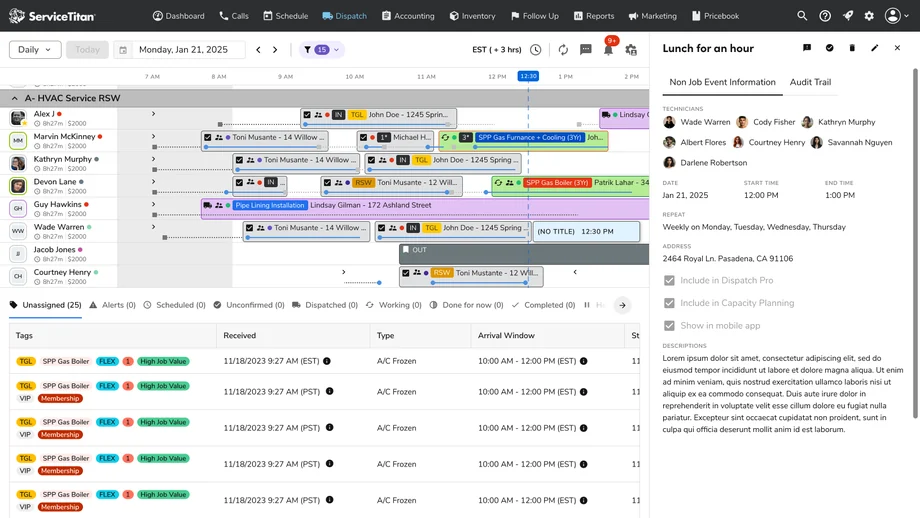
Opening an event shows everything at a glance: every technician on it, the date and time, a readable repeat rule, the address, and whether it’s included in Dispatch Pro, Capacity Planning, and the mobile app. Next to the event information, a new Audit Trail tab records a granular edit history, including field-level before-and-after changes, who made each change, and where it came from. It supports troubleshooting and the record-keeping needs of larger customers.
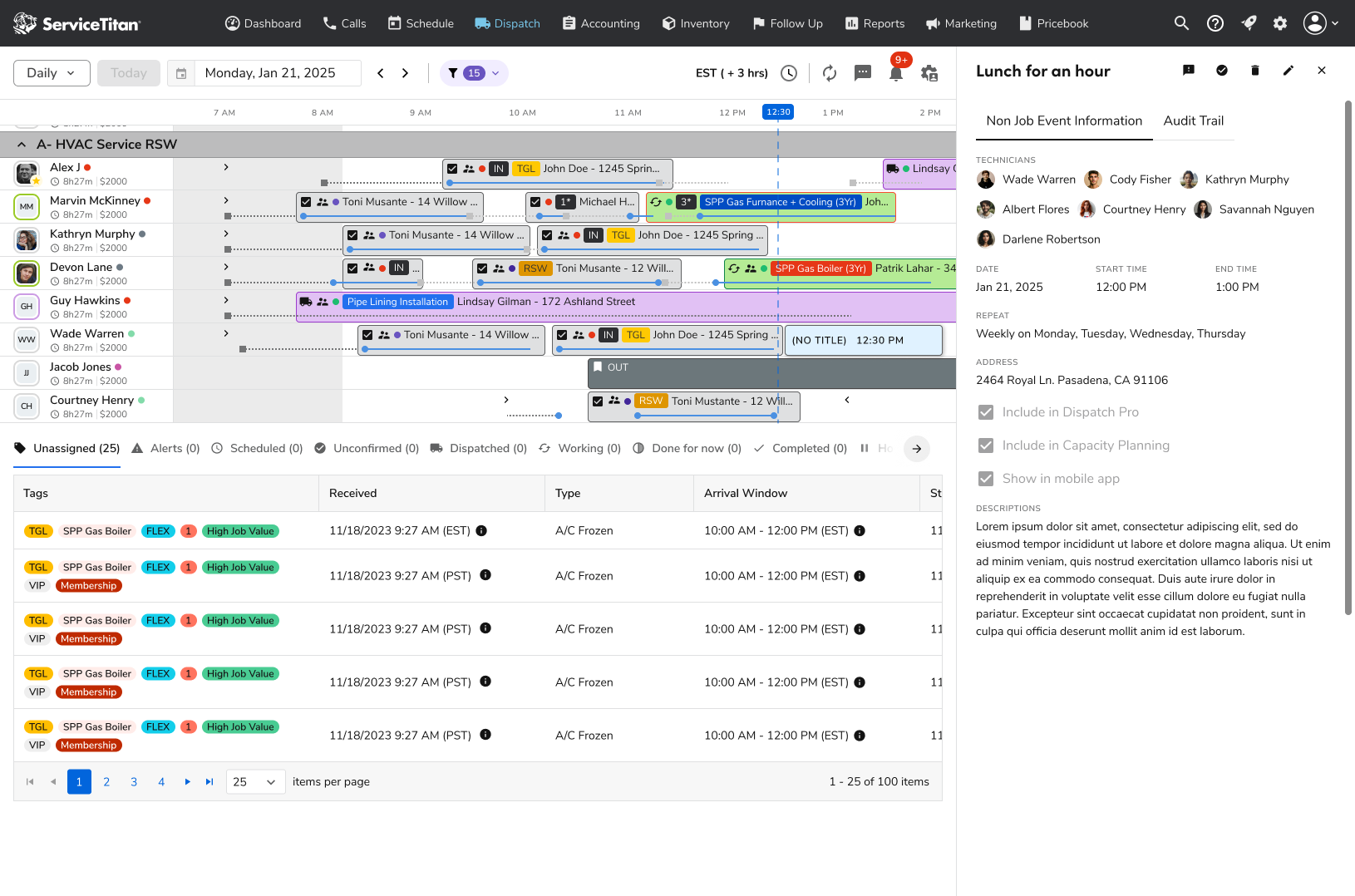
Event details show who’s on the event, when it repeats, and where it counts, with the Audit Trail one tab away.
Editing Recurring Events
Multi-technician recurring events raised a question the old experience never answered: whose schedule is this change for? When a dispatcher edits a recurring event, a dialog lists every technician on it and asks which ones the edit applies to, then whether it covers this event, this and following events, or the whole series. One technician can leave a weekly lunch block without changing it for everyone else.
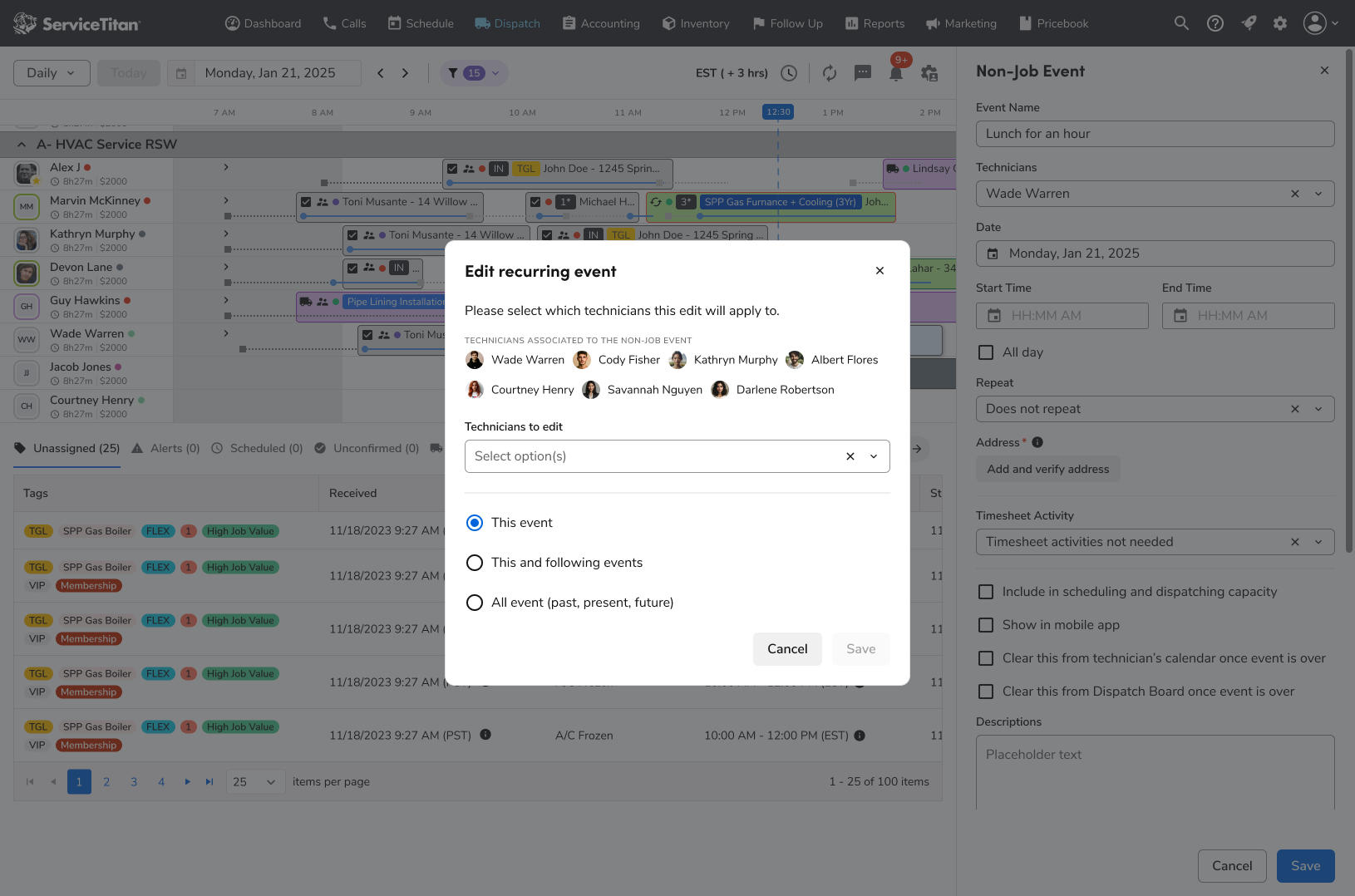
Recurring edits are scoped by technician and by occurrence.
Completing Events
Completing events was added during the project to match job scheduling. Because an event can belong to several technicians, the Complete event dialog shows everyone associated with it and asks which technicians to mark complete, so one person finishing early doesn’t close the event for the whole group.
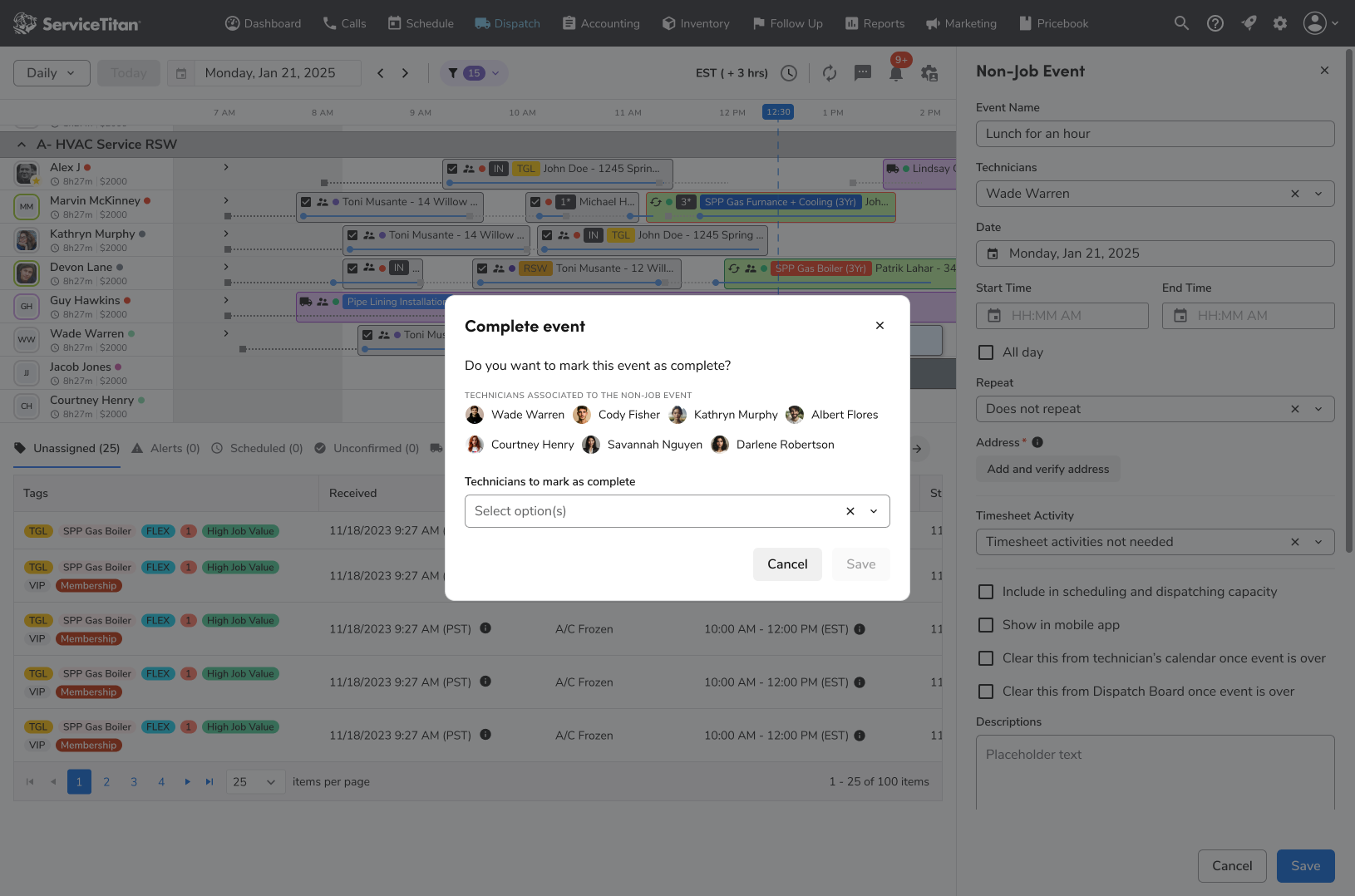
Dispatchers choose exactly which technicians to mark complete.
Notable Details
- Character limits: a character limit with a clear counter and validation message prevents event names from overflowing across the three boards, and descriptions show a live counter too.
- Time zones: recurring events keep the wall-clock time the dispatcher set, and the board, panel, and details views all use the same time zone rule.
- Mobile compatibility: redesigned events keep working in the existing technician mobile apps, without forcing new technician-facing workflows.
Research & Validation
The need was clear before design started: NJEs were among the top sources of dispatch support tickets, and teams behind Capacity Planning, Dispatch Pro, and Payroll pointed to incomplete NJE integrations as a blocker to adoption.
- Support and help content review: Help Center FAQs explaining how NJEs behaved differently across platforms, along with support data, showed where users were confused and where edits failed.
- Community signals: dispatchers in community forums asked how to hide NJEs from technicians, trigger timesheet codes, or block scheduling conflicts, which revealed a fragmented understanding of the feature.
- Internal subject-matter experts: conversations with the Capacity Planning, Dispatch Pro, and Payroll teams shaped the integration controls and timesheet code selection.
- Design feedback: early designs of the redesigned panel were shared for feedback and received a positive response. Usage tracking and session reviews were planned to validate recurrence, multi-tech scheduling, and drop-off once the new experience was live.
Outcomes
The redesign moved NJEs from a workaround toward a first-class scheduling tool.
- Dispatchers can create and manage recurring and multi-technician events in one place, instead of re-creating them every week.
- Integration controls give teams direct control over how events affect Dispatch Pro, Capacity Planning, and mobile.
- The audit trail gives support and admins a clear record of what changed, by whom, and from where.
- Rollout was planned in stages from early access to general availability, measured against the support, satisfaction, and adoption targets above.
Reflections
The biggest lesson was that “small” features like non-job events carry a lot of hidden weight. They touch payroll, capacity, automation, and technician schedules, so unclear behavior quickly turns into support cases and workarounds.
Mirroring the job scheduling patterns dispatchers already knew made the redesign feel familiar, but the real value came from making behavior explicit: clear controls instead of hidden rules, and an audit trail instead of guesswork. Keeping a tight scope (no auto-scheduling, reporting, or mobile redesign) let us fix the foundations first. Next, I’d use the planned tracking to see how recurrence and multi-tech scheduling are actually used, and decide which of the deferred capabilities matter most.